Take airport pickup and drop bookings from every channel, price them with your airport fares, assign the right driver and keep the traveller informed from booking to drop. CabCRM keeps all airport transfers in the same dashboard as the rest of your trips.
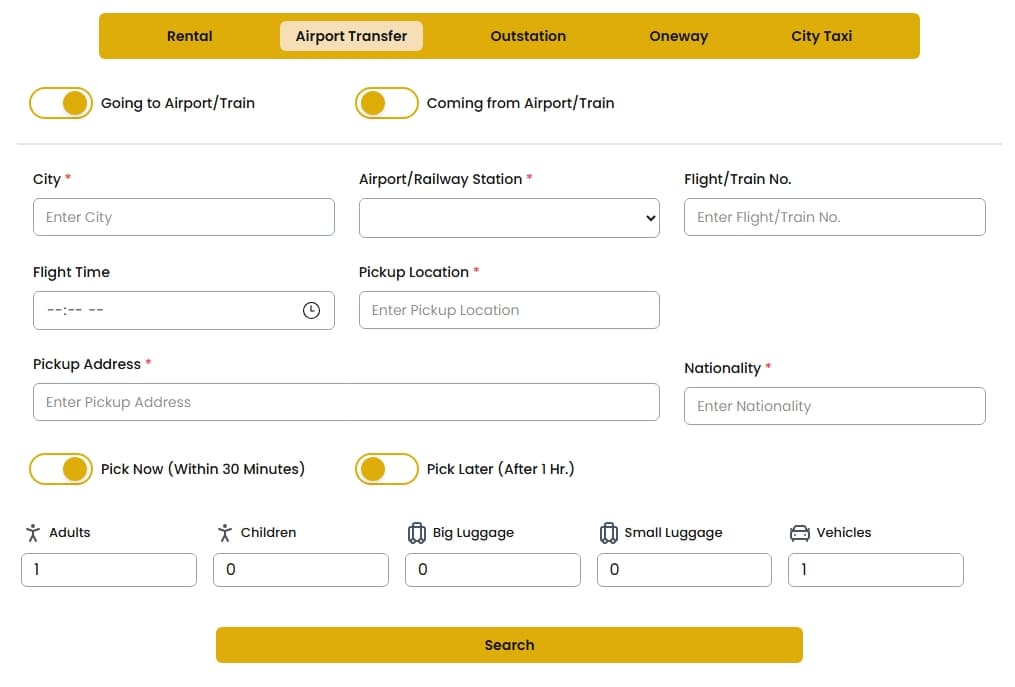

Airport Bookings
Customers, travel agents and corporate clients book airport pickups and drops from your website, app or through your team. The airport is picked from a list, the fare comes from your airport transfer rates, and the booking lands in the dispatch list with the pickup time.
Driver Assignment
Assign airport trips to your own drivers or to vendors in your network, set the garage start time so the cab reaches the terminal on time, and follow the trip live on the map.
Passenger Notifications
Travellers receive the booking confirmation and an itinerary link by email or WhatsApp. Driver and cab details can be shared a set number of hours before pickup, and calls between traveller and driver can use masked numbers.
Reports
See every airport trip in booking history, close duties with duty slips and send invoices to customers and corporate clients from the same system.
Yes. Airport pickup and drop bookings can come from your website, mobile app, your team or API partners, and all of them appear in one dashboard.
You set airport transfer fares per city and vehicle type in your fare settings. The fare is applied automatically when the booking is made.
Yes. You choose how many hours before pickup the driver and vendor contact details are shared with the traveller.
Yes. Corporate bookings can follow an approval step, use the company's credit limit and be billed on the company's invoice.